Know what else has to change.
An agent reads the checkout in front of it. It cannot see that this file has moved together with three others for two years, or that two services in other repositories follow it within the week. That is not in the code — it is in the commits. Git Synapse reads them and answers before the pull request goes up.
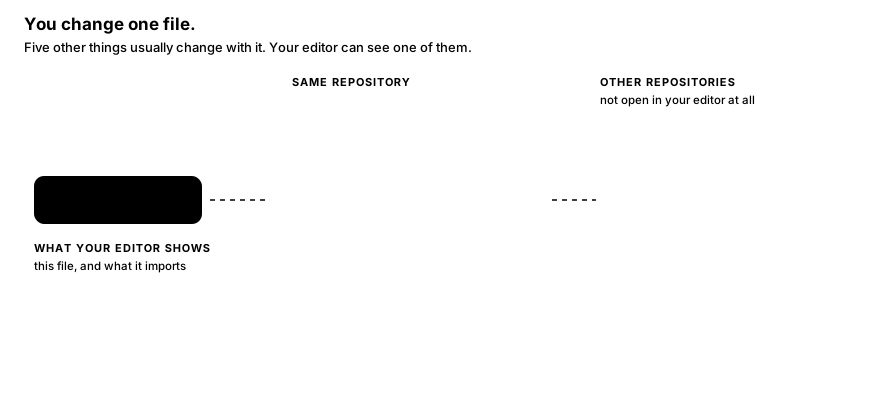
Every number here is evidence from real commits, not a guess: how many times the pair actually moved together, and how quickly the other repository followed.
One repository, more files than you touched
A change lands in the model, the serializer, the migration and the test. Miss one and review catches it, or production does. History already knows which four travel together.
Many repositories, none of them open
Split across services, the file that has to change next is in a checkout the agent never opened. Declared dependencies and observed version bumps say which repository follows, and how fast.
How it knows, from git alone
No language server, no AST, no build — just commits, and the manifests read out of the history itself.
Inside a repository
The only fact used is this commit touched this file. Pairs that keep landing in the same commit build support, scored by several measures rather than one. Sweeping commits are capped so a mass rename invents nothing, renames are followed, and rebased duplicates are dropped by patch id.
Between repositories
Manifests are read at every commit that changed them — go.mod, package.json, Cargo.toml, pom.xml, Chart.yaml and about thirty more. One naming another is a declared edge; every time that pin moves is an observed bump.
Why the days are real
Both ends of a bump are commits, so the gap between them is measurable: upstream commit to the downstream commit that adopted it. The median of those lags is how “usually follows within three days” is known — and a bump whose upstream is newer than its consumer is thrown out, not believed.
Run Git Synapse.
Choose how you want to run it. Local Docker is for a laptop or small server; Kubernetes / Helm is for a shared cluster.
Local Docker
This downloads Git Synapse, offers to install Docker if it is missing, starts the app, waits for it to be healthy, and prints the URL.
The installer uses the newest published release. If no release exists yet, it uses main. Set GIT_SYNAPSE_REF to install a specific tag or branch. On Windows, open PowerShell and run:
ADMIN_EMAIL and ADMIN_PASSWORD in .env and restart — the account is created on start, and editing the password there resets it.Prefer to inspect the installer first?
Download install.sh or install.ps1, review it, then run it locally. The installer never overwrites an existing .env.
Kubernetes: install the chart from source
Use this path when you already have a Kubernetes cluster and Helm. The chart creates the app, scheduler, MCP server, Postgres, migration job, health checks, and persistent storage.
oci://ghcr.io/kirankn8/charts/git-synapse
will not resolve. The chart in the repository is complete and installs fine; you build the image once and
point the chart at it. If you just want to try Git Synapse, take the Docker path above instead.Build and push the image to a registry your cluster can pull from:
Then install the chart from the checkout, pointing it at that image:
You need a Kubernetes cluster, kubectl, and Helm already installed. The chart does not try to install a cluster because cluster providers differ.
A cluster is shared, so the chart always requires a sign-in. It creates a Kubernetes Secret named
git-synapse holding ADMIN_EMAIL and a generated ADMIN_PASSWORD. Read it with:kubectl -n git-synapse get secret git-synapse -o jsonpath='{.data.ADMIN_PASSWORD}' | base64 -d; echoSet
secrets.adminEmail to your own address. Helm prints this command in its notes too.Open http://localhost:8080 and sign in with the address and password above. For a shared deployment, enable the chart's Ingress and use your organization's hostname instead.
What gets persisted?
Postgres data is stored in a Postgres PVC. Git mirrors are stored in the chart's mirror PVC. Secrets remain in Kubernetes so upgrades do not rotate them. For production, use managed Postgres and an RWX storage class, then set postgresql.enabled=false and configure externalDatabase.
How is the Kubernetes Secret protected?
The password is stored as ADMIN_PASSWORD in the Kubernetes Secret; it is not printed in application logs. Kubernetes Secret values are base64-encoded by default, so production clusters should enable etcd encryption and restrict Secret access with RBAC. Helm release metadata can also contain rendered values, so limit access to Helm release Secrets.
How do upgrades work?
Use helm upgrade ... --reuse-values. The chart runs the schema migration Job as part of the release and the API uses health probes before it is considered ready. If a rollout fails, use helm rollback git-synapse -n git-synapse.
Manual Docker setup
Install Docker Desktop
Docker runs the app and its database together. You do not need host Python, Git, or Postgres.
Install Docker Desktop for Mac, open it, and wait until it says Docker is running.
Install Docker Desktop for Windows, open it, and wait until it says Docker is running. Use PowerShell for the commands below.
Install Docker Engine and the Docker Compose plugin. Confirm that docker compose version works.
Download Git Synapse
Open Terminal, PowerShell, or your preferred shell and copy these commands.
Already have the project? Just open a terminal in its folder and continue.
Start the stack
This starts the API, web UI, Postgres, scheduler, and MCP server.
Docker may download images and create the database. That is normal.
When it finishes, open http://localhost. If port 80 is busy, try http://localhost:8080.
It does not open
Run docker compose ps. The services should be running. To see what is wrong, run docker compose logs api --tail=80. If port 80 is occupied, use http://localhost:8080.
Decide who can see it
Optional on a laptop. Not optional on anything others can reach.
The dashboard opened without asking who you are, and a banner says so. That is the whole of it until you change it: there is no account to create and no token to paste. To require a sign-in, put both of these in .env and restart.
The account is created when the API starts. Editing the password here and restarting resets it, so a forgotten one never needs a console.
Anyone who can reach the port can read everything in it. On a laptop that is fine; on anything shared, set the two variables above before you add repositories.
Add a repository
Nothing is imported until you name a source. Paste a URL in the dashboard, or use the CLI.
From the dashboard
Open Sources, press Add, and paste any of these:
https://github.com/octocat/Hello-WorldImports just that repository.https://github.com/my-orgLists what the owner has, so you can pick.https://git.example.com/team/app.gitNo host API needed for a single repository.Importing starts on the next refresh. To start it immediately, open Jobs and press Run now.
From the CLI
Useful for scripting, or for adding a whole organisation at once.
For private repositories, or to list an organisation, put a GitHub token in
.env as GITHUB_TOKEN and restart with docker compose up -d.How to tell it worked. The Repositories page shows a commit count once the import finishes; a large repository takes a few minutes the first time and is fast afterwards. Open a repository, pick a file, and you will see the files that changed with it, ranked by the evidence behind each pair.
Connect your coding agent
An MCP server and a skill file: the agent checks its own change for what it missed, before it reports the work done.
The MCP server is already running beside the dashboard. Everything below points one client at the same address:
Streamable HTTP. If your client is not listed here, give it that URL — that is all it needs.
One command, from anywhere:
Check it with claude mcp list.
Add to ~/.cursor/mcp.json for every project, or .cursor/mcp.json for one:
Add to .vscode/mcp.json in your project:
Add to opencode.json:
Settings → Connectors → Add custom connector, and give it the URL above.
On a build with no remote connectors, run it as a subprocess instead — in claude_desktop_config.json, with the path to your checkout:
Authorization: Bearer gss_… — in Claude Code, append --header "Authorization: Bearer gss_…"; in a JSON config, add a "headers" object beside the URL.Give it the skill too
Connecting the server hands the agent the tools. The skill tells it when to reach for them — as a completeness check before reporting work finished — and when a result is noise, which is most of the value. For Claude Code:
Any other agent: paste SKILL.md into whichever instructions file it reads.
How to tell it worked. Ask your agent something like “what usually changes with src/…/models.py?” A connected agent answers with file names and co-change counts. Every call is also logged on the Activity page in the dashboard.
You're ready 🎉
Open a file in the dashboard and read its strongest couplings, or let your agent check its own diff before it calls the work done. The scheduler refreshes known repositories every hour.
All fourteen tools are listed in the README.
Quick troubleshooting
Most first-run problems are one of these.
Docker says the port is already in use
Open http://localhost:8080, or change API_HTTP_PORT / API_PUBLISHED_PORT in .env, then run docker compose up -d again.
The repository says it cannot be found
A private repository looks the same as a missing repository without credentials. Add a token with permission to read it, then retry the source.
I want to stop it but keep my data
docker compose down stops the services and preserves the Postgres volume. Start again with docker compose up -d.
I want to erase everything
Use make nuke only when you really want to remove the database and mirrors. This cannot be undone.